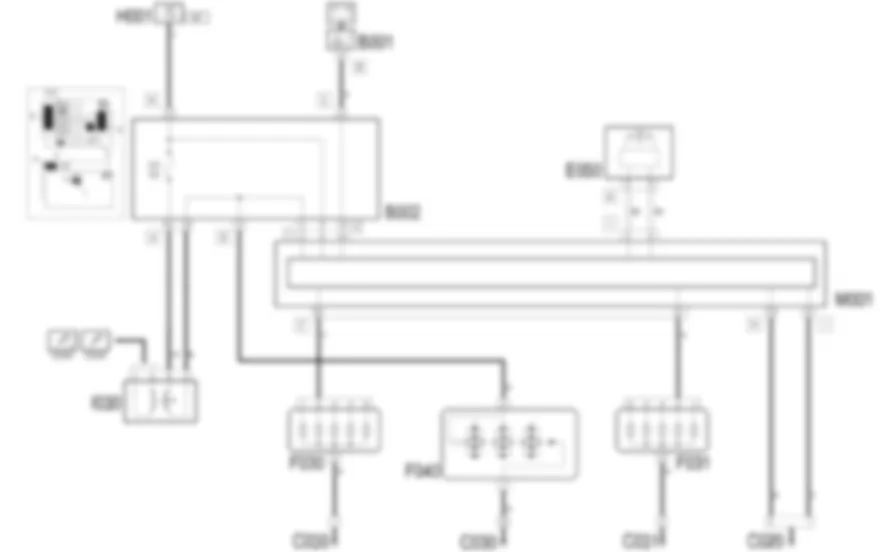
DescriptionThe brake lights are located at the rear in the side lights and in the central third brake light and consist of 5 separate bulbs.These are operated whenever the brake pedal is pressed, by means of a switch on the pedal itself.23the switch fitted on the pedal assembly consists of two contacts which supply two signals: the first which is the 'N.A.' type recognizes the position of the brake pedal when it differs from the rest position, i.e. pedal pressed; the second, which is the 'N.C.' type, recognizes the brake pedal in the rest position. The lights are switched on by the N.A. contact (pedal pressed). The 'N.A.' switch information is sent, in particular to the engine management control unit and the ABS control unit. 2399341SeeE5030PETROL ENGINE ELECTRONIC MANAGEMENT , 2399345SeeE5050DIESEL ENGINES ELECTRONIC MANAGEMENT , 2399383SeeE7020ABS . The control function is activated by the go ahead signals from the key in the ON position (INT) and the contact for the above mentioned switch.The correct operation of the side lights is controlled by the brake lights 'check' function: the following are checked:0pen circuit (bulb missing or wiring broken)short circuit to earth (bulb short circuit or wiring short circuit to earth)short circuit to Vbatt (wiring short circuit to Vbatt)The continuity of the fuse protecting the switch on the brake pedal is also checked.If one of the situations described above is detected, the Body Computer notifies the CAN of the failure state: the special 'lights failure' warning light in the instrument panel comes on and, at the same time, the information is shown on the display.23the centre third brake light is operated directly by the switch on the pedal and is not subjected to a check.
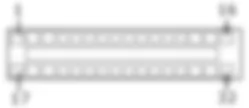
Functional description The supply for the switch I30 is controlled by the ignition (INT) from the line for fuse F37 of the underdashboard control unit B2 : when the brake pedal is pressed, the switch closes and sends the 'N.A.' signal to the Body Computer M1 , pin 2 of connector F. The Body Computer M1 controls the supply for the brake lights in the light clusters F30 (left) F31 (right) from pins 32 and 33 of connector E. The Body Computer M1 is connected, via the CAN line, to the instrument panel E50 to manage the failure warning light or the fuse if there is a failure in the circuit. The switch I30 directly controls the centre brake light F40 via the underdashboard control unit B2, pin 5 of connector D with no control logic.
<anchor>0</anchor><span>Removing</span><icon><imageid>20</imageid></icon>1Refitting21Open the bonnet lid.1. Release the retainers (1a) and remove the cover (1b).2050746
<anchor>0</anchor><span>Removing</span><icon><imageid>20</imageid></icon>1Refitting212400802-7040A37fuse box cover - r r1. Disconnect the electrical connections (1a, 1b, 1c, 1d, 1e, 1f).2. Undo the bracket retaining bolt.3. Slightly move the bracket (3a) for the dashboard trim and undothe bolt (3b).4. Undo the other bolts securing the body computer/junction unit.5. Slightly move the body computer/junction unit assembly.6. Disconnect the electrical connections (6a, 6b, 6c).7. Recover the body computer/junction unit.2050752
<anchor>0</anchor><span>Removing</span><icon><imageid>20</imageid></icon>1Refitting211. Disconnect electronic control unit electrical connections (1a),(1b), (1c).2. Undo the bolts.3. Recover the control unit.2050753
<anchor>0</anchor><span>Removing</span><icon><imageid>20</imageid></icon>1Refitting211. Disconnect electronic control unit electrical connections (1a),(1b), (1c).2. Undo the bolts.3. Recover the control unit.2050754
<anchor>0</anchor><span>Removing</span><icon><imageid>20</imageid></icon>1Refitting21Open the tailgate.1. Remove the flap (1a) releasing the retainers (1b) and then (1c). 2. Disconnect the electrical connection.3. Unscrew the nuts.4. Remove the light cluster from the outside.2050801
5540A50
<anchor>0</anchor><span>Removing</span><icon><imageid>20</imageid></icon>1Refitting212400584-5540A44l/h or r/h tail light(one) - r+r1. Release retainers (1a) and raise bulb holder (1b) with seal.2050802
5540A94
<anchor>0</anchor><span>Removing</span><icon><imageid>20</imageid></icon>1Refitting211. Release retainer (1a) and then (1b). Recover the lens protection(1c).2. Remove bulb (2a) by releasing side retainers (2b).23 The number plate light bulb holderis an integral part of the outer handle; to remove it 2400752-7015B30exterior handle or blocksupport - r+r with panel/protection removed2050804
<anchor>0</anchor><span>Removing</span><icon><imageid>20</imageid></icon>1Refitting21Open the tailgate.1. Undo the bolts.2. Move the third brake light mounting.2050831
5550D17
<anchor>0</anchor><span>Removing</span><icon><imageid>20</imageid></icon>1Refitting21Open the tailgate.1. Undo the bolts.2. Move the third brake light mounting.2050834
5550D18
<anchor>0</anchor><span>Removing</span><icon><imageid>20</imageid></icon>1Refitting212400395-3380A44handbrake/linkage protection- r+r1. Move the switch after releasing the retainer.2. Disconnect the electrical connection.3. Recover the switch.2050836
5550D22
<anchor>0</anchor><span>Removing</span><icon><imageid>20</imageid></icon>1Refitting21Ensure that the ignition key is in theOFF position, then disconnect the negative battery terminal (-). 1. Disconnect the electrical connection from the reversing lightsswitch.2. Undo and remove the reversing lights switch.2050837
We use cookies to enhance your browsing experience, serve
personalized ads or content, and analyze our traffic. By clicking "Accept All",
you consent to our use of cookies. Privacy Policy