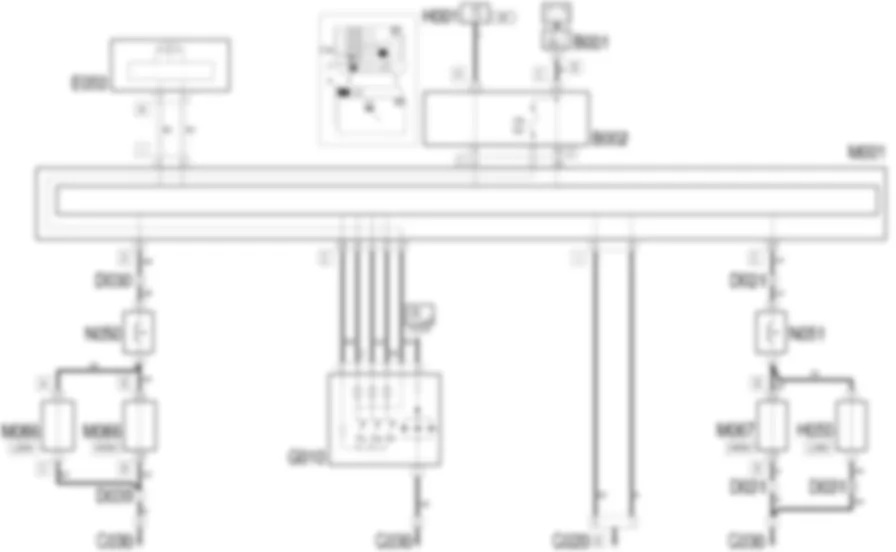
DescriptionThe front courtesy light includesthree bulbs with three control switches:the map reading lights can be switched on via the outsideswitches.the centre switch can be used to switch the centre lighton or off and it also has a delay function as described below.The front courtesy light timing iscontrolled according to a logic managed by the Body Computer, whilstthat of the rear is controlled by the door control units in accordancewith a logic transmitted via the CAN from the Body Computer:when one of the doors is opened, the courtesy light istimed to stay on for 3 minutes;if, whilst opening one door, another is opened, the countingof the three minutes starts again from zero;if a door remains open for longer than three minutes,the courtesy light goes out and remains off until one of the doorsis next opened;If, during this period of 3 minutes, all the doors areclosed again, a second period of 10 seconds is activated and isinterrupted if the ignition key is turned on;when the doors are unlocked using the remote control,the courtesy light comes on for 10 seconds; the timing is interruptedif the ignition key is turned ON;when the doors are closed and locked, the courtesy lightgoes out immediately.The switching off and on should be gradual(dimmer) with a cycle lasting 2 seconds.The courtesy light also comes on for 15minutes if the inertia switch is operated (the information is sentvia the instrument panel CAN). This function is activated withthe ignition key in the ON position.The map reading lights come on by activatingthe button, but go out automatically after 15 minutes.The Body Computer continuously acquiresthe 'battery voltage' signal and compares it with a limit ('SBMT'function): if the battery voltage level goes below this limit, itintervenes through the CAN sending a signal to disable a seriesof loads: these include the front courtesy light; this functionis activated with the key in the OFF position; this function alsodeactivates loads after the key has been in the OFF position for15 minutes.The map reading lights are turned on usingthe button, but go out automatically after 15 minutes.
Functional description The Body Computer M1 receives door open input signals at pin 8 of connector D (driver's door) and pin 25 of connector E(passenger door). The front courtesy light G10 is suppliedby the direct line protected by fuse F39 of the junction unit underthe dashboard B2. The front courtesy light G10 is controlledby the Body Computer M1 with a timer: pin 28 of connector E ofM1 receives an analogue control signal from the three buttons onthe actual courtesy light: as a result the Body Computer M1 suppliesthe courtesy lights G10, according to the battery voltage controllogic ('SBMT') described previously, providing a timed earth signalfrom pins 21, 30 and 37, connector E for the three map reading lights separately. The Body Computer M1 is connected, viathe CAN SeeE1050 CAN CONNECTION LINES line,to the instrument panel E50, from which it receives the 'inertiaswitch operated' signal which lights up the courtesy lights andsends a signal which, if necessary, can light up the 'doors open'warning light. The 'low battery voltage' signal which switchesoff the courtesy lights if they are on, reaches the Body Computer M1 viathe CAN line.
<anchor>0</anchor><span>Removing</span><icon><imageid>20</imageid></icon>1Refitting211. Remove the cover (1a) releasing the retainers (1b).2. Undo the bolts.3. Move the courtesy light slightly.2045233
<anchor>0</anchor><span>Removing</span><icon><imageid>20</imageid></icon>1Refitting211. Release the switch unit (1a), releasing the retainers (1b).2. Disconnect the electrical connections (2a (2b).3. Recover the switch unit.2045153
7005M12
<anchor>0</anchor><span>Removing</span><icon><imageid>20</imageid></icon>1Refitting211. Release the switch holder trim (1a), releasing the retainers(1b).2. Disconnect the electrical connection.3. Keep the switch holder trim.2045154
<anchor>0</anchor><span>Removing</span><icon><imageid>20</imageid></icon>1Refitting211. Disconnect the electric window motor connection.2. Undo the bolts.3. Remove the motor releasing the splined shaft.2045156
<anchor>0</anchor><span>Removing</span><icon><imageid>20</imageid></icon>1Refitting21Open the bonnet lid.1. Release the retainers (1a) and remove the cover (1b).2044997
<anchor>0</anchor><span>Removing</span><icon><imageid>20</imageid></icon>1Refitting212429579-7040A30Left instrument panellower TRIM - R.R.1. Disconnect the electrical connections (1a, 1b, 1c, 1d, 1e, 1f).2. Undo the left-threaded bolt securing the facia trim mount beam.3. Undo the bolts securing the body computer/junction unit.4. Move facia trim (4a) slightly and move body computer/junctionunit (4b) downwards.5. Disconnect the electrical connections (5a, 5b, 5c).6. Recover the body computer/junction unit.2045005
<anchor>0</anchor><span>Removing</span><icon><imageid>20</imageid></icon>1Refitting211. Disconnect electronic control unit electrical connections (1a),(1b), (1c).2. Undo the bolts.3. Recover the control unit2045007
<anchor>0</anchor><span>Removing</span><icon><imageid>20</imageid></icon>1Refitting211. Disconnect electronic control unit electrical connections (1a),(1b), (1c).2. Undo the bolts.3. Recover the control unit2045008
<anchor>0</anchor><span>Removing</span><icon><imageid>20</imageid></icon>1Refitting211. Release and open the anti-break in protection.2. Remove the lock retainer access cover.3. Release the idler device (3a) from the lock retainers (3b) and(3c).2045157
We use cookies to enhance your browsing experience, serve
personalized ads or content, and analyze our traffic. By clicking "Accept All",
you consent to our use of cookies. Privacy Policy